
多代理合作:角色
父子agent
将主干逻辑(项目管理、思考路径规划)和死胡同探索(读文件、跑代码测试)分离。父智能体像个“项目经理”,当遇到具体杂活时(比如“去帮我看看用户登录相关的代码都在哪里并分析一下”),它启动一个子智能体.减少注意力分散”的问题
1 | """ |
工作原理
- 父智能体有一个
task工具。子智能体拥有除task外的所有基础工具 (禁止递归生成)。1
2
3
4
5
6
7
8
9PARENT_TOOLS = CHILD_TOOLS + [
{"name": "task",
"description": "Spawn a subagent with fresh context.",
"input_schema": {
"type": "object",
"properties": {"prompt": {"type": "string"}},
"required": ["prompt"],
}},
] - 子智能体以
messages=[]启动, 运行自己的循环。只有最终文本返回给父智能体。1
2
3return "".join(
b.text for b in response.content if hasattr(b, "text")
) or "(no summary)"
后台任务
“慢操作丢后台, agent 继续想下一步” ,后台线程跑命令, 完成后注入通知。
多线程并行,后台任务 结果在下一个LLM call前注入回主线程
1.主线程启动子线程后立即返回
1 | self.tasks[task_id] = {"status": "running", "command": command} |
2.子进程完成后, 结果进入通知队列。
1 | with self._lock: |
3.加一个主动查询的TOOL
每次 LLM 调用前排空通知队列。但是并不能保证所有的后台任务都已经完成了。 这个时候可以去干其他不依赖的任务。
这个涉及到多任务并行时候的AI系统调度,状态追踪与上下文唤醒。
在通过”事件通知(Notification injection)”和”主动查询(Polling)”建立的极其轻量的异步模型中,LLM 要想知道”跑哪个任务”、”什么时候回去”,完全依靠以下四种内在机制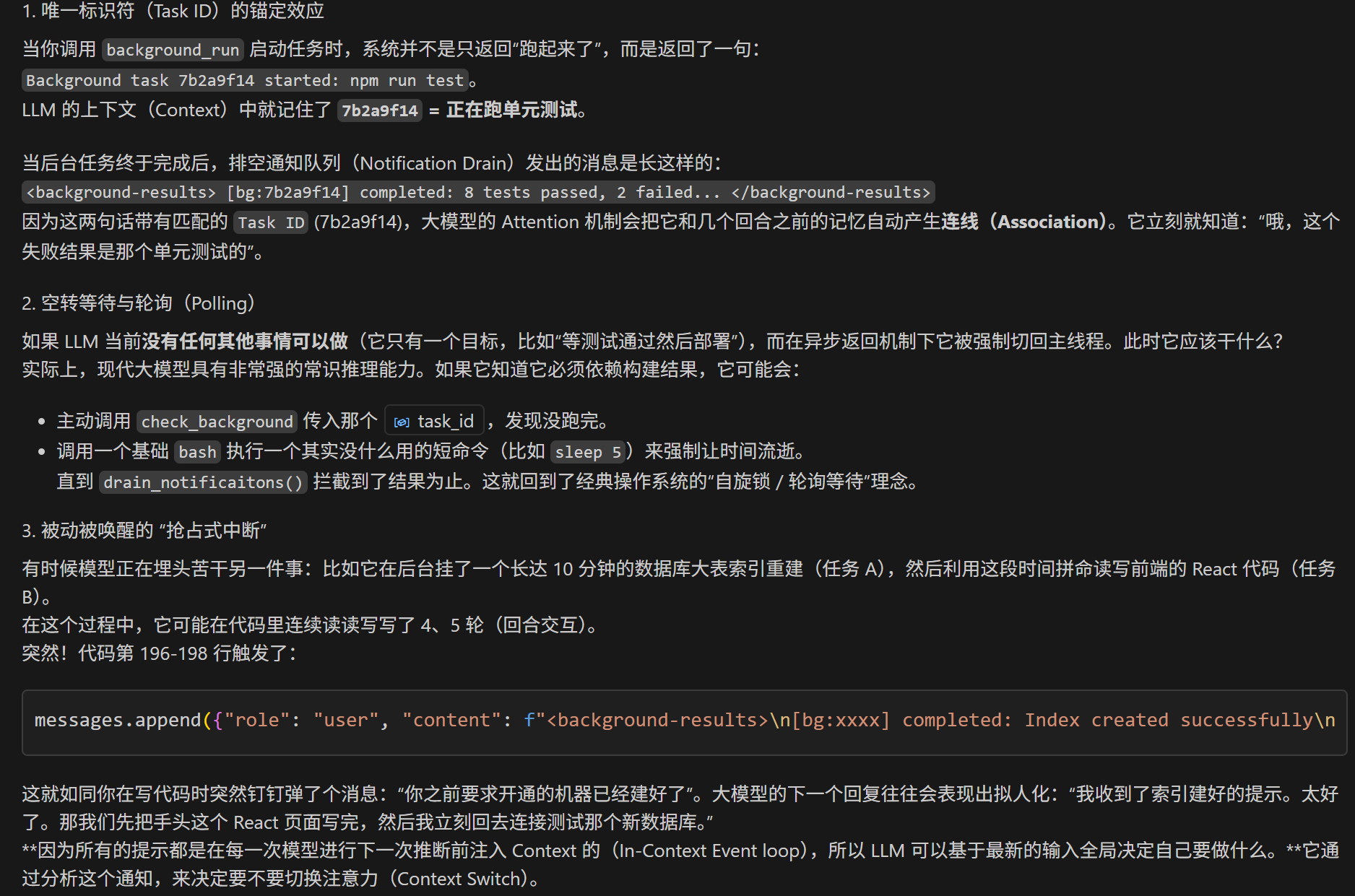
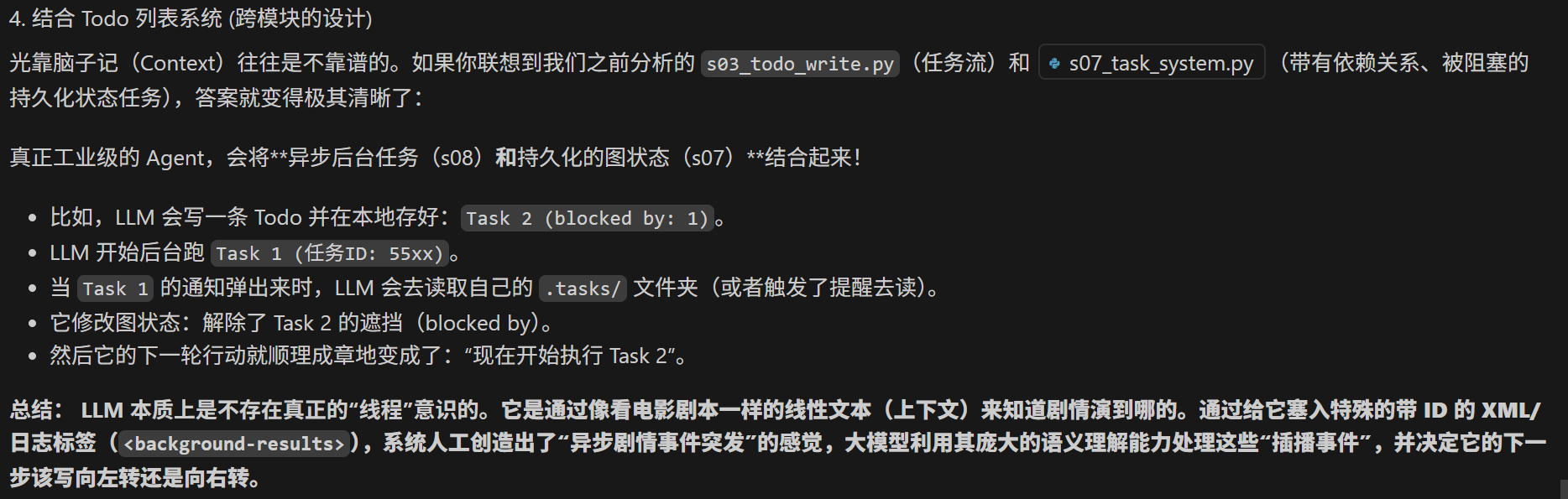
总结来说,基于AI的任务调度,全靠 AI的常识决定跑哪个任务+轮询过程中显式调动记忆工具查task情况。
注意在调用background 工具的时候,相当于隔了一层再调用,agent并不知道这个子线程调用的具体内容,只能知道返回结果。所以要先返回在记忆里记一笔,去和未来的结果匹配。
但是在并发跑多任务的时候,怎么处理上下文压缩和注意力涣散问题?
在单一主线上(s06 的 Context Compact),我们只需要删掉前几轮的旧日志就行。但在多并发并行任务的网状结构下,简单的按轮次删除彻底失效了(因为重要的和不重要的日志会交织乱序出现),导致 LLM 急剧陷入严重的“注意力涣散(Attention Dilution)”甚至“完全崩溃找不着北”。
当前工业界的顶尖 Agent 架构往往采用一套“隔离+分层+结构化”的多维打法
- 整个task都扔到子智能体里,主进程只负责总结task结果和task调度问题
- 并发任务的状态(Running/Failed/Blocked),以及每次的关键输出都写入 系统文件系统上的 JSON。通过磁盘里的task存储来查阅相关信息
- 结构化路由的注意力锚定
即使日志少,同时收到三个事件推送也会让大模型发懵。我们需要用非常严密的结构和特定语法去锁定模型的注意力,并在提词(Prompt)工程上强制模型思考。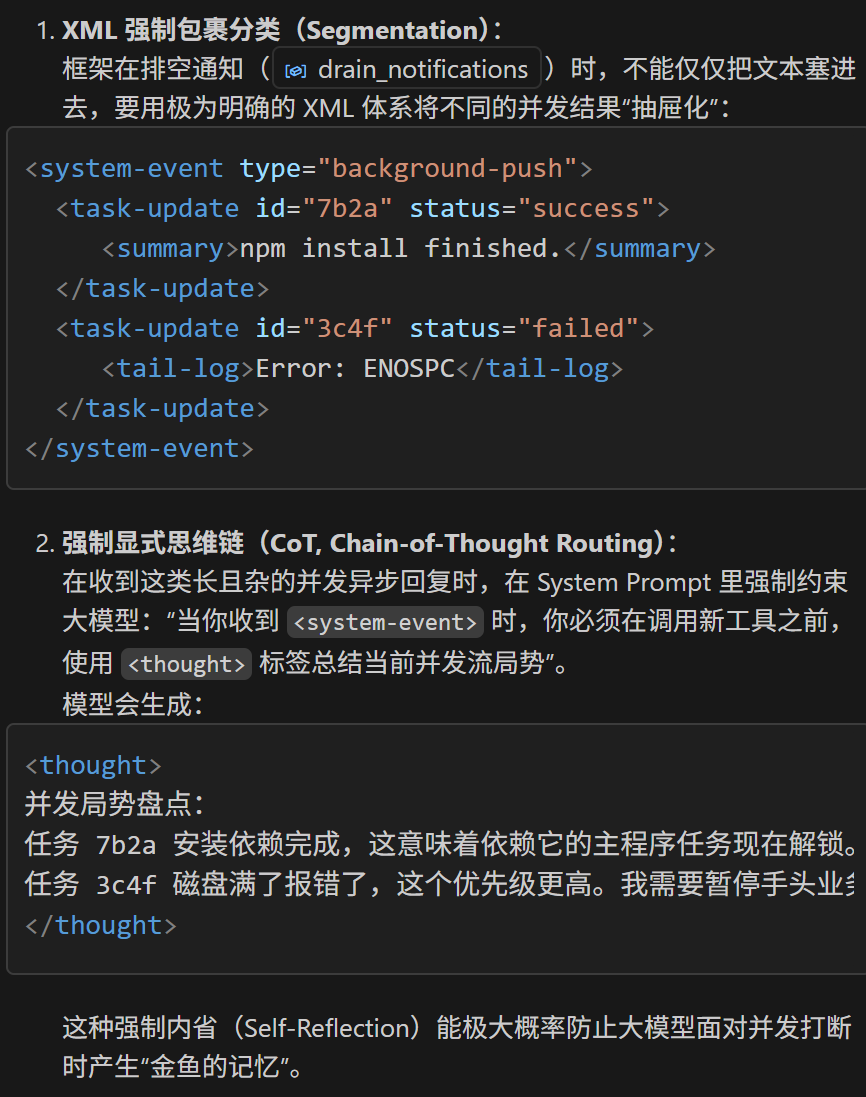
智能体团队
子智能体 (s04) 是一次性的: 生成、干活、返回摘要、消亡。没有身份, 没有跨调用的记忆。后台任务 (s08) 能跑 shell 命令, 但做不了 LLM 引导的决策。
真正的团队协作需要三样东西: (1) 能跨多轮对话存活的持久智能体, (2) 身份和生命周期管理, (3) 智能体之间的通信通道。
解决方案
团队邮箱 – 多个模型, 通过文件协调。
1 | Teammate lifecycle: |
- TeammateManager 通过 config.json 维护团队名册。
1
2
3
4
5
6
7class TeammateManager:
def __init__(self, team_dir: Path):
self.dir = team_dir
self.dir.mkdir(exist_ok=True)
self.config_path = self.dir / "config.json"
self.config = self._load_config()
self.threads = {} spawn()创建队友并在线程中启动 agent loop。1
2
3
4
5
6
7
8
9def spawn(self, name: str, role: str, prompt: str) -> str:
member = {"name": name, "role": role, "status": "working"}
self.config["members"].append(member)
self._save_config()
thread = threading.Thread(
target=self._teammate_loop,
args=(name, role, prompt), daemon=True)
thread.start()
return f"Spawned teammate '{name}' (role: {role})"- MessageBus: append-only 的 JSONL 收件箱。
send()追加一行;read_inbox()读取全部并清空。1
2
3
4
5
6
7
8
9
10
11
12
13
14class MessageBus:
def send(self, sender, to, content, msg_type="message", extra=None):
msg = {"type": msg_type, "from": sender,
"content": content, "timestamp": time.time()}
if extra:
msg.update(extra)
with open(self.dir / f"{to}.jsonl", "a") as f:
f.write(json.dumps(msg) + "\n")
def read_inbox(self, name):
path = self.dir / f"{name}.jsonl"
if not path.exists(): return "[]"
msgs = [json.loads(l) for l in path.read_text().strip().splitlines() if l]
path.write_text("") # drain
return json.dumps(msgs, indent=2) - 每个队友在每次 LLM 调用前检查收件箱, 将消息注入上下文。
1
2
3
4
5
6
7
8
9
10
11
12
13
14def _teammate_loop(self, name, role, prompt):
messages = [{"role": "user", "content": prompt}]
for _ in range(50):
inbox = BUS.read_inbox(name)
if inbox != "[]":
messages.append({"role": "user",
"content": f"<inbox>{inbox}</inbox>"})
messages.append({"role": "assistant",
"content": "Noted inbox messages."})
response = client.messages.create(...)
if response.stop_reason != "tool_use":
break
# execute tools, append results...
self._find_member(name)["status"] = "idle"
无论是最初与(用户)交互的主智能体(Lead Agent),还是它后续孵化出来的所有其他子智能体线程(Teammates:如 Alice, Bob),它们在执行机构造上几乎是完全一模一样的。
不同点:
- 初始化配置(身份与任务入口)System Prompt(身份说明)
- 可用工具(Tools 权限限制):
- 主智能体拥有管理权限(它拥有
spawn_teammate,list_teammates,broadcast_message等“老板工具”)。 - 子智能体只拥有基础的打工工具(
bash,read_file,write_file)以及相互之间的通信工具(send_message, read_inbox)。它自己不能再嵌套孵化徒子徒孙了。
- 主智能体拥有管理权限(它拥有
- 主智能体:读取用户的控制台输入 query,接着它前面自己所有的历史对话。
主智能体循环
1 | def agent_loop(messages: list): |
子智能体循环
1 | for _ in range(50): |
在 Alice 的世界(子线程)里:
由于 Alice (前端子智能体) 的 System Prompt 规定了:"Use send_message to communicate. Complete your task."(用发消息工具沟通)。
所以当 Alice 写完了登录页面后,她大模型判断任务完成,并在自己的循环里调用工具:send_message(to="lead", content="老板,Login页面我写好了,代码放在 src/Login.tsx 里了,你可以测试了。")。
然后 Alice 把这条消息写入了 .team/inbox/lead.jsonl 这个物理文件里。随后她自己待机去了。
在 Lead 的世界(主线程)里:
主线程不管在干嘛,它进入下一轮思考的瞬间,系统会首先强制去读取 lead.jsonl(清空它的收件箱)。
系统发现里面有 Alice 留下的那封信。
它会立刻把这封信伪装成一个 <inbox>...Alice: 老板我写完了...</inbox> 的系统提示,强行塞进 Lead 智能体的 Context 里。
Lead 智能体在这一刻突然读到了这条提示,它的大脑根据之前的记忆立刻得出推论:“哦!Alice 把登录页面写好了。那我接下来可以调用 read_file 去检查那个代码,或者启动部署流程了。”
团队协议
s09 中队友能干活能通信, 但缺少结构化协调:
关机协调: 直接杀线程会留下写了一半的文件和过期的 config.json。需要握手 – 领导请求, 队友批准 (收尾退出) 或拒绝 (继续干)。
计划审批: 领导说 “重构认证模块”, 队友立刻开干。高风险变更应该先过审。
两者结构一样: 一方发带唯一 ID 的请求, 另一方引用同一 ID 响应。
加两个tool:通过BUS传递信息
Alice
1 | if tool_name == "shutdown_response": |
Leader
1 | def handle_shutdown_request(teammate: str) -> str: |
在prompt里写规则
1 | sys_prompt = ( |
- 领导生成 request_id, 通过收件箱发起关机请求。
1
2
3
4
5
6
7shutdown_requests = {}
def handle_shutdown_request(teammate: str) -> str:
req_id = str(uuid.uuid4())[:8]
shutdown_requests[req_id] = {"target": teammate, "status": "pending"}
BUS.send("lead", teammate, "Please shut down gracefully.",
"shutdown_request", {"request_id": req_id})
return f"Shutdown request {req_id} sent (status: pending)" - 队友收到请求后, 用 approve/reject 响应。一个 FSM, 两种用途。同样的
1
2
3
4
5
6
7if tool_name == "shutdown_response":
req_id = args["request_id"]
approve = args["approve"]
shutdown_requests[req_id]["status"] = "approved" if approve else "rejected"
BUS.send(sender, "lead", args.get("reason", ""),
"shutdown_response",
{"request_id": req_id, "approve": approve})pending -> approved | rejected状态机可以套用到任何请求-响应协议上。
自治团队
s09-s10 中, 队友只在被明确指派时才动。领导得给每个队友写 prompt, 任务看板上 10 个未认领的任务得手动分配。这扩展不了。
真正的自治: 队友自己扫描任务看板, 认领没人做的任务, 做完再找下一个。
一个细节: 上下文压缩 (s06) 后智能体可能忘了自己是谁。身份重注入解决这个问题。
- 待机空转 (Idle Phase):Alice 此时无事可做,于是每隔 5 秒去轮询一次这两边不同的目录。
看看微信有没有领导私信:读 .team/inbox/alice.jsonl
inbox = BUS.read_inbox(name)
看看整个公司的 Jira 板子上有没有没人认领的工作:扫描 .tasks/task_*.json
unclaimed = scan_unclaimed_tasks() - 决策:只要在任何一个文件系统(Inbox 或 Tasks)中发现了新进展,Alice 就会把内容注入进自己的上下文,唤醒大模型开始干活。
工作原理
- 队友循环分两个阶段: WORK 和 IDLE。LLM 停止调用工具 (或调用了
idle) 时, 进入 IDLE。read_inbox有东西就是WORK,不然就是IDLE,去读看板1
2
3
4
5
6
7
8
9
10
11
12
13
14
15
16
17
18
19def _loop(self, name, role, prompt):
while True:
# -- WORK PHASE --
messages = [{"role": "user", "content": prompt}]
for _ in range(50):
read_inbox
response = client.messages.create(...)
if response.stop_reason != "tool_use":
break
# execute tools...
if idle_requested:
break
# -- IDLE PHASE --
self._set_status(name, "idle")
resume = self._idle_poll(name, messages)
if not resume:
self._set_status(name, "shutdown")
return
self._set_status(name, "working") - 空闲阶段循环轮询收件箱和任务看板。
1
2
3
4
5
6
7
8
9
10
11
12
13
14
15
16def _idle_poll(self, name, messages):
for _ in range(IDLE_TIMEOUT // POLL_INTERVAL): # 60s / 5s = 12
time.sleep(POLL_INTERVAL)
inbox = BUS.read_inbox(name)
if inbox:
messages.append({"role": "user",
"content": f"<inbox>{inbox}</inbox>"})
return True
unclaimed = scan_unclaimed_tasks()
if unclaimed:
claim_task(unclaimed[0]["id"], name)
messages.append({"role": "user",
"content": f"<auto-claimed>Task #{unclaimed[0]['id']}: "
f"{unclaimed[0]['subject']}</auto-claimed>"})
return True
return False # timeout -> shutdown - 任务看板扫描: 找 pending 状态、无 owner、未被阻塞的任务。
1
2
3
4
5
6
7
8
9def scan_unclaimed_tasks() -> list:
unclaimed = []
for f in sorted(TASKS_DIR.glob("task_*.json")):
task = json.loads(f.read_text())
if (task.get("status") == "pending"
and not task.get("owner")
and not task.get("blockedBy")):
unclaimed.append(task)
return unclaimed - 身份重注入: 上下文过短 (说明发生了压缩) 时, 在开头插入身份块。
1
2
3
4
5
6if len(messages) <= 3:
messages.insert(0, {"role": "user",
"content": f"<identity>You are '{name}', role: {role}, "
f"team: {team_name}. Continue your work.</identity>"})
messages.insert(1, {"role": "assistant",
"content": f"I am {name}. Continuing."})
任务隔离
到 s11, 智能体已经能自主认领和完成任务。但所有任务共享一个目录。两个智能体同时重构不同模块 – A 改 config.py, B 也改 config.py, 未提交的改动互相污染, 谁也没法干净回滚。
任务板管 “做什么” 但不管 “在哪做”。解法: 给每个任务一个独立的 git worktree 目录, 用任务 ID 把两边关联起来。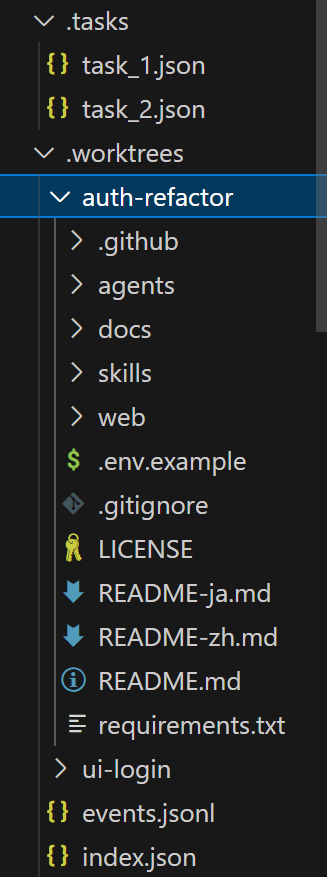
相对 s11 的变更
| 组件 | 之前 (s11) | 之后 (s12) |
|---|---|---|
| 协调 | 任务板 (owner/status) | 任务板 + worktree 显式绑定 |
| 执行范围 | 共享目录 | 每个任务独立目录 |
| 可恢复性 | 仅任务状态 | 任务状态 + worktree 索引 |
| 收尾 | 任务完成 | 任务完成 + 显式 keep/remove |
| 生命周期可见性 | 隐式日志 | .worktrees/events.jsonl 显式事件流 |
工作原理
- 创建任务。 先把目标持久化。
1
2TASKS.create("Implement auth refactor")
# -> .tasks/task_1.json status=pending worktree="" - 创建 worktree 并绑定任务。 当智能体决定开始处理某个
pending状态的任务时,它会主动调用工具(例如WORKTREES.create("auth-refactor", task_id=1))。这会在那一瞬间检出新的子目录,并传入task_id把任务状态推进为in_progress。绑定同时写入两侧状态:1
2
3
4WORKTREES.create("auth-refactor", task_id=1)
# -> git worktree add -b wt/auth-refactor .worktrees/auth-refactor HEAD
# -> index.json gets new entry, task_1.json gets worktree="auth-refactor"
`git worktree` 技术。不会完整复制.git历史仓库,所有的子目录都**共享**主目录的底层 Git 对象数据库。它仅仅占用一份当前代码文本的空间,创建速度极快,非常轻量。同时git自动为它分配一个独立的新分支(例如 `wt/auth-refactor`)。智能体在子目录中提交 (`git commit`) 代码后,可以在主智能体通过标准的 `git merge` 命令或在云端拉取请求 (PR) 将该分支合并回主分支。合并后1
2
3
4
5
6def bind_worktree(self, task_id, worktree):
task = self._load(task_id)
task["worktree"] = worktree
if task["status"] == "pending":
task["status"] = "in_progress"
self._save(task) - 在 worktree 中执行命令。
cwd指向隔离目录。1
2subprocess.run(command, shell=True, cwd=worktree_path,
capture_output=True, text=True, timeout=300) - 收尾。 两种选择:
-worktree_keep(name)– 保留目录供后续使用。
-worktree_remove(name, complete_task=True)– 删除目录, 完成绑定任务, 发出事件。一个调用搞定拆除 + 完成。一键删除临时的 worktree 物理目录,并将关联的任务状态更新为completed.在 Git 中执行 git worktree remove,仅仅是删除了那个临时的工作物理文件夹,在那个文件夹里 commit 的代码并不会消失。1
2
3
4
5
6def remove(self, name, force=False, complete_task=False):
self._run_git(["worktree", "remove", wt["path"]])
if complete_task and wt.get("task_id") is not None:
self.tasks.update(wt["task_id"], status="completed")
self.tasks.unbind_worktree(wt["task_id"])
self.events.emit("task.completed", ...) - 事件流。 每个生命周期步骤写入
.worktrees/events.jsonl事件类型:1
2
3
4
5
6{
"event": "worktree.remove.after",
"task": {"id": 1, "status": "completed"},
"worktree": {"name": "auth-refactor", "status": "removed"},
"ts": 1730000000
}worktree.create.before/after/failed,worktree.remove.before/after/failed,worktree.keep,task.completed。
崩溃后从.tasks/+.worktrees/index.json重建现场。会话记忆是易失的; 磁盘状态是持久的。
任务之间有依赖怎么办?
依赖关系仍然由 .tasks目录下的任务依赖图(Graph)来控制(延续之前章节的设计)。如果任务 B 依赖任务 A,智能体不会认领任务 B。必须等到任务 A 完成并且代码被合并后,智能体才会认领任务 B,此时为任务 B 创建的全新 worktree 就会包含任务 A 的最新代码。
所以也不能太轻易地标记completed。
- 状态机强校验:任务不应该只有
in_progress -> completed。中间必须插入in_review或merged状态。只有检测到 Git 树中该分支已被合并,才能把任务标记为彻底结束。 - 基于上一个分支拉取:注意看
worktree_create工具,它支持一个可选参数 base_ref。如果前一个任务没合并,大模型其实可以通过传入 base_ref=”wt/上一任务”,让下一个任务直接建立在上一个未合并的分支之上(这叫 Task Chaining 任务链)。 - 强加 Prompt 约束:在 System Prompt 里面强制要求模型:
"You must use 'bash' to git merge your worktree branch into main before destroying it and completing the task."
 alipay